Steps
- 1
While the timer runs, open the project menu on the Timer page or in the menu-bar panel. On a widget, press "Switch project", which opens the project list in the window.
- 2
Pick the project you want. Only projects with an hourly rate can be picked.
- 3
If the session has under 5 minutes of worked time, Qufy asks "Move this session to {project}?". Press "Move" to move it, or "Cancel" to keep it where it is.
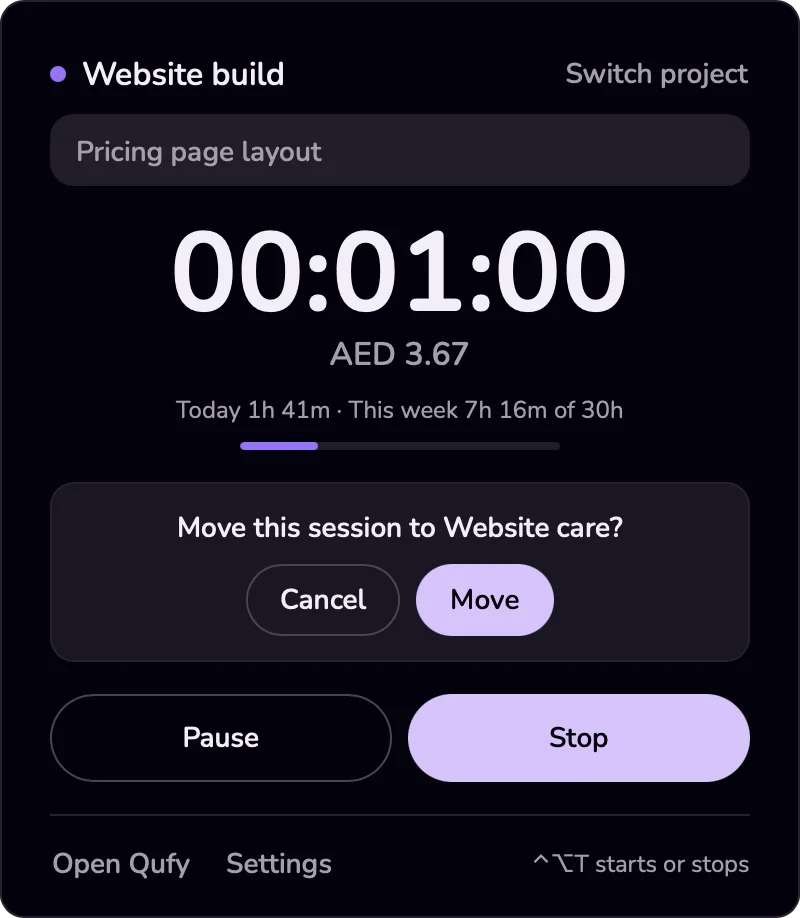
- 4
If the session has 5 minutes or more, there is no question: the current session ends now, and a new one starts on the new project.
Good to know
- Moving keeps the same session, start time and note. Only the project changes, and the new project's hourly rate is copied onto the whole session.
- Switching after 5 minutes saves the first session with its note at its own rate. The new session uses the new project's rate.
- The 5 minutes count worked time only; paused time is left out.
- To fix a session after it has ended, use the Hours page. The project of a finished session cannot be changed there, so delete it and add the time again with "Add time" if needed.
If something goes wrong
- “Set an hourly rate before starting.”
- The project you picked has no rate. Set one on the Projects page, then switch again.
- “That project is gone. Pick another one.”
- The project was deleted or archived on the website. Press "Refresh" on the Timer page and pick another project.
Last updated 6 Oct 2026
Was this helpful?