Steps
- 1
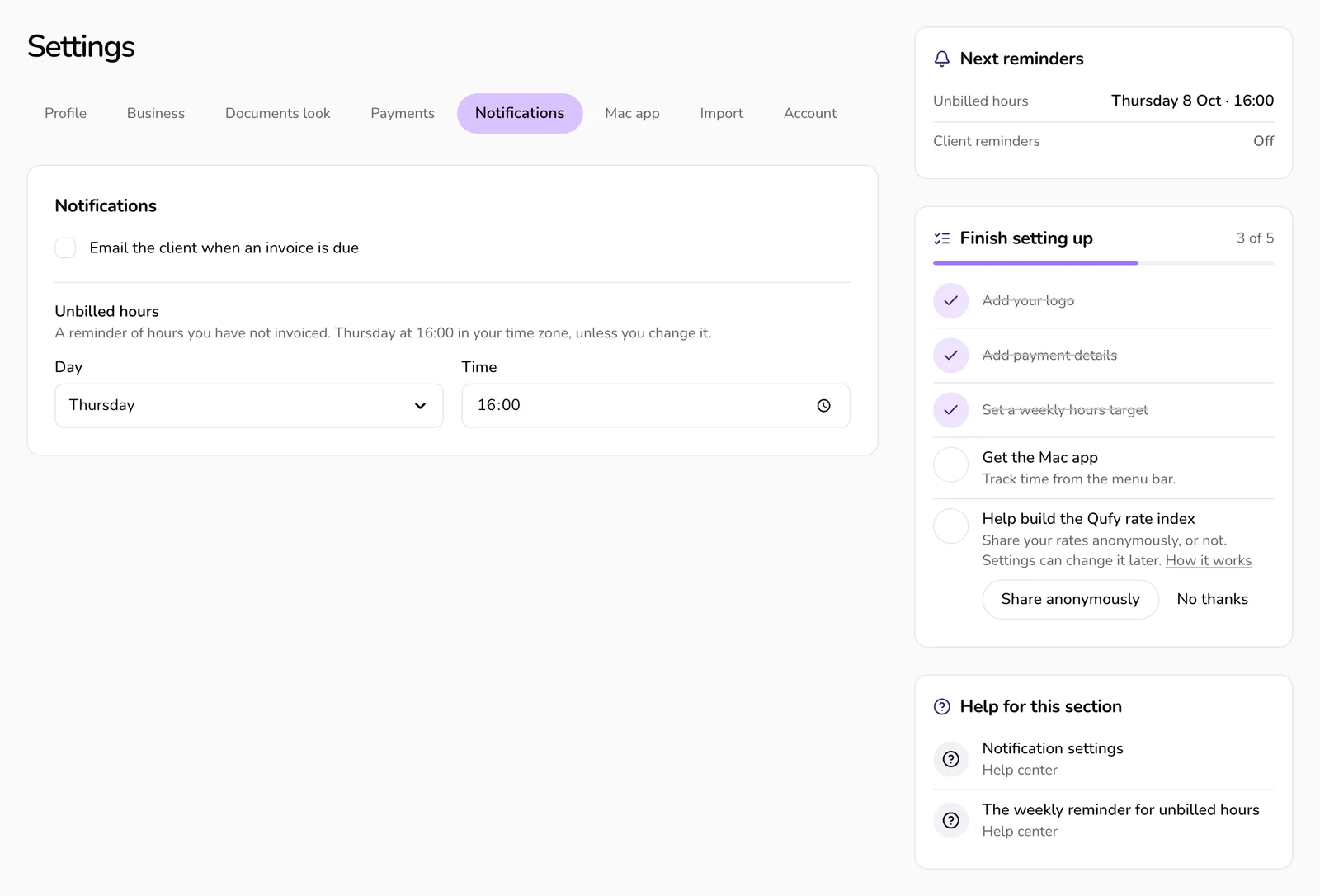
Open “Settings” and choose “Notifications” in the bar of sections at the top.
- 2
Tick “Email the client when an invoice is due”.
- 3
Press “Save changes” in the bar that appears at the end of the section.
- 4
To be reminded later about one invoice, go to Documents, open the ⋯ menu on its row, and choose “Remind in 7 days”.
Good to know
- The client email is off until you turn it on. It is one message, from you, with the amount and the link, and the client needs an email.
- Only invoices get due-date reminders. The reminder date is the invoice's due date, and it is set again each time you save the invoice. Quotes and contracts get no due-date reminder.
- “Remind in 7 days” moves the reminder to 7 days from today. It is offered for sent invoices that are not paid. Saving the invoice again sets it back to the due date.
- Reminders run once a day, at 08:00 Cairo time. Paid and declined documents are skipped.
- You always get a “Reminder” notice in the bell and by email. The rail beside Notifications shows “Next reminders”.
- The client gets one email for that date only when all of these are true: the setting is on, the document is an invoice, the invoice has a working client link (made in the last 14 days and not turned off), the client has a valid email, and the client has not stopped reminders. Otherwise only you are reminded.
- If a client did not get a reminder, check that the setting is on, the client has an email, and the invoice still has a working link. If the link is older than 14 days, turn it off and send a new one.
- Every client reminder has a stop link at the bottom. It opens a page that says “Stop reminder emails for this invoice? The invoice itself does not change.” with a “Stop reminders” button. After that the client sees “Done. No more reminder emails for this invoice.” It stops reminders for that one invoice only.
- “Unbilled hours” in the same section is a separate reminder for you about hours you have not invoiced. Set the “Day” (or “Off”) and the “Time”; the default is Thursday at 16:00 in your time zone. It arrives as a notification from the Mac app, not by email.
If something goes wrong
- “This link is not valid.”
- The client opened an incomplete stop link. Ask them to use the full link from the reminder email.
Last updated 6 Oct 2026
Was this helpful?