Home is the first page after you sign in. From top to bottom it shows: a greeting with the date, and “Running” with the project name while a timer runs; “Finish setting up your office” with “Your office is N% ready”, until the setup is finished or put off, and after that while the office is not fully ready; the box “Turn a client message into a quote” with “Make a quote” and “Try an example:” (three messages from your field); the “Get started” card, while it applies; three money tiles, “Owed to you” (with the overdue part in red), “Unbilled time”, and “Paid this month” (compared with the same days last month); “Needs you”; “This week”, a day chart of your hours with “Open Time”; “Pipeline”, which counts your projects by status (each opens the Projects list filtered to that status); and “Recent activity”.
Beside Home on a wide screen, and under it on a phone, a column shows “Coming up”, “Insights from your account”, “Finish setting up”, “For your work”, and “What's new”. A module with nothing to show is left out.
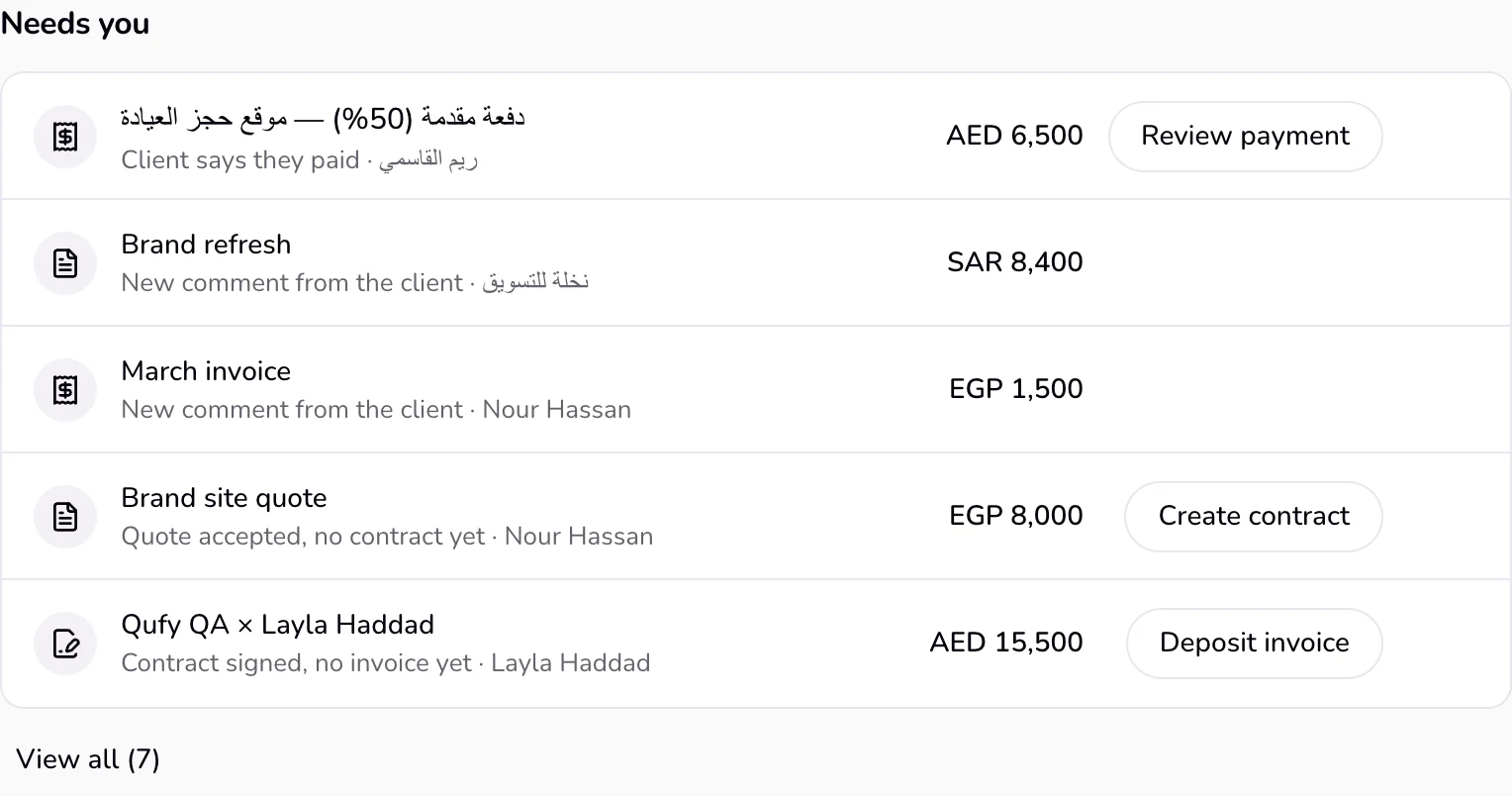
“Needs you” is a short to-do list that Qufy builds from your documents, links, projects, and tracked time. It holds at most 7 rows, most urgent first, shows the first 5 with “View all” for the rest, and ignores archived documents.
Steps
- 1
Open Home from the sidebar.
- 2
In “Needs you”, read a row: the document or project name, and under it the reason it is there. Press the row itself to open its project (or the document when it has no project).
- 3
Press the row’s one button to deal with it; other choices are under “⋯” at the end of the row. The row goes away once the reason is gone.
Good to know
- “Client says they paid”: the client tapped “I've paid” on an unpaid invoice. “Review payment” opens a panel on the side with the amount, when the client said it, and their note: “Confirm payment” marks the invoice paid; “Not yet” clears the claim.
- “New comment from the client”: a client commented on a document. The row has no button: press its name to open the document; the comment is then marked read and the row goes away.
- “Quote accepted, no contract yet”: an accepted quote has no contract on the same project (or, without a project, no later contract for the same client). “Create contract” opens a contract filled from the quote.
- “Contract signed, no invoice yet”: a signed contract has no invoice, by the same matching rule. “Deposit invoice” opens the contract's project, where you invoice the deposit and later the balance with the agreed terms; it never makes one full invoice that could charge twice. A contract from before projects were made automatically gets its project on this click.
- “Invoice is past due”: an invoice that is not a draft, declined, or paid, and whose due date has passed. “Follow up” writes a short message with the assistant and opens it in WhatsApp (if the client has a phone number) or your email app (if the client has an email). “Mark paid” is under “⋯”.
- “Invoice is due soon”: the due date is today or within the next 3 days. “Follow up” opens the same kind of message, and “Mark paid” is under “⋯”. Qufy itself does not send an email from this button.
- “Monthly retainer, this month not invoiced yet”: a monthly retainer project reached its billing day and the month has no invoice. “Invoice this month” opens the month's invoice, filled and not saved.
- “Unbilled time older than a week”: a project has finished, uninvoiced time that started more than 7 days ago (sessions under a minute don’t count; monthly retainer and fixed-price projects are left out). “Invoice hours” opens an invoice filled from all of that project’s unbilled time; nothing is saved until you save or send it.
- “Quote sent and not opened”: the client has not opened the quote link at least 3 days after it was made. “Follow up” opens a short follow-up message.
- “Draft untouched for a week”: a draft has not changed for 7 days. “Finish draft” opens it. “Delete” is under “⋯” and asks first.
- When nothing needs you, the section reads “You're all caught up.”
Last updated 6 Oct 2026
Was this helpful?